How to Reset eXPerience if It Stops Responding Due to an Unsupported File
Reading Time: 2 minutes
If eXPerience is unresponsive due to an unsupported file being opened, it may try to load this file each time it starts, causing the software to freeze. To fix this, reset the software installation by following these steps:
Steps to Reset eXPerience 8 on Windows
- Run eXPerience with the Reset Option:
- In the Start menu, navigate to All Programs > eXPerience 8 > and select eXPerience 8 64bit.
- Hold down the Alt key on your keyboard, then click on eXPerience 8 64bit to open it. Keep holding the Alt key until the Maintenance dialog appears.
- If the dialog does not appear, repeat this step, ensuring the Alt key is held down before clicking on the software icon.
- Reset the Software:
When the Maintenance dialog appears, click OK to reset eXPerience to its default state.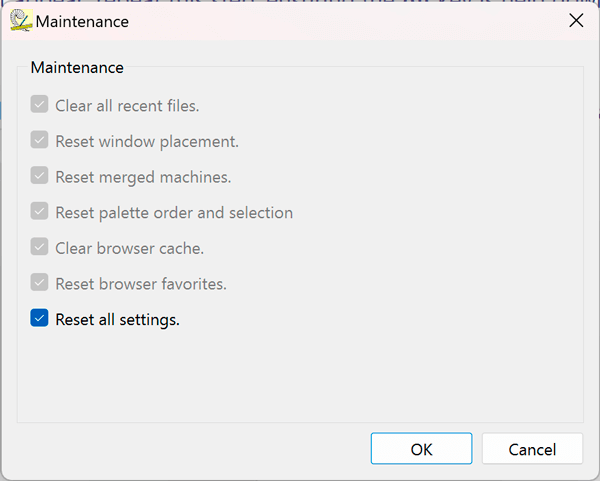
- Open eXPerience:
The software should now start normally without attempting to load the unsupported file.
Steps to Reset eXPerience 8 on macOS
- Open the Applications Folder:
In Finder, go to the Applications folder and locate the eXPerience app. - Start eXPerience with the Reset Option:
Hold down the Alt key on your keyboard. While holding the Alt key, double-click the eXPerience app. Do not release the Alt key until the next step. - Open the Maintenance Dialog:
The Maintenance dialog should appear. If it does not, repeat the steps above, ensuring that you hold down the Alt key before double-clicking on the app. - Reset the Software:
In the Maintenance dialog, click OK to reset all settings. - Restart eXPerience:
eXPerience should now start normally without attempting to load the unsupported file.
This reset will remove the problematic file from the welcome screen and restore the default software settings. If you continue to experience issues, please contact eXPerience support for further assistance.
eXPerience Facebook Page
Happy crafting and don’t forget to share your creations with us in the
eXPerience Facebook Page!