Where can I find the Serial number of my USB key
Reading Time: 1 minute
If you need to find the serial number for your eXPerience USB key, you can do so directly within the software. The serial number is essential for support, troubleshooting, and certain activation processes.
Here’s how to find it:
- Open eXPerience Software:
Launch the eXPerience software on your computer. - Navigate to the “Help” Menu:
Once eXPerience is open, go to the Help menu located in the top toolbar. - Select “About”:
In the Help menu, select the About option. This will open a window with detailed information about your eXPerience installation. - Locate the Serial Number:
In the About window, look for the Serial Number field. The serial number typically starts with “50-00…”, “60-00…”, or “70-00…”.
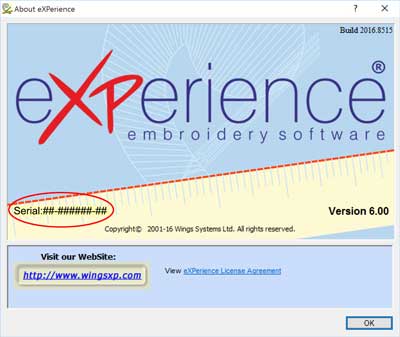
Make a note of this serial number for future reference. If you encounter any issues with your USB key or need assistance from eXPerience support, having this serial number readily available will be helpful.
eXPerience Facebook Page
Happy crafting and don’t forget to share your creations with us in the
eXPerience Facebook Page!